


Gather: The Foraging App
4.364.00 Reviews
App Specs
- Version
- 1.6.0
- Updated On
- License
- Free
- Downloads
- 10,000+
- Developer
- Feral Foraging, LLC
- Categories
- Education
- Platform
- Android
Screenshots
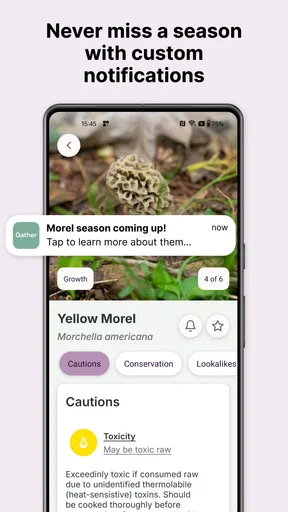
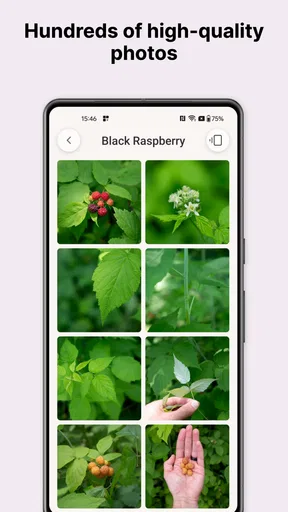
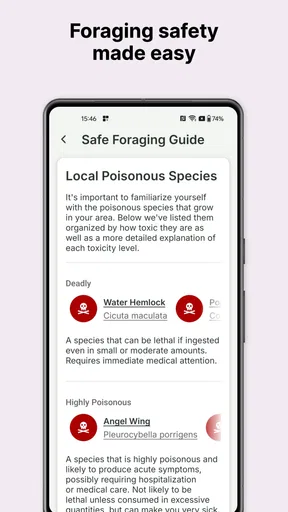
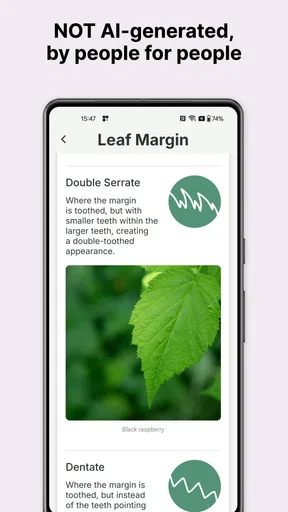
 Analysis by AppCompare
Gather: The Foraging App is the kind of education app I would open when a walk becomes more interesting than expected. A plant beside the trail, an unfamiliar mushroom after rain, or a patch of leaves in a local park can turn an ordinary outing into a question. Gather gives that curiosity a practical direction by focusing on wild plants and mushrooms rather than trying to be a general nature encyclopedia.
I reviewed it as an everyday learning tool, not as a replacement for expert identification or a guarantee of safe eating. That distinction matters with foraging. The app can help you slow down, observe, and build knowledge, but a confident-looking match should never be treated as permission to consume an unknown species. In my experience, its greatest value is encouraging careful attention outdoors.
Developed by Feral Foraging, LLC, this free Education app has reached over ten thousand installs and holds a 4.3 average from more than a hundred ratings. It is rated for Everyone, so its subject is approachable for families and beginners, while the real usefulness depends on how patiently each person checks what they see. The current version is 1.6.0, and it runs on Android 7.0 or later.
How Gather feels to read and navigate
I want this section to focus on the practical reading experience: how I would break an unfamiliar plant or mushroom entry into manageable observations instead of trying to absorb everything at once. That approach can make a short session easier to revisit later, especially when the first encounter happens outdoors. Next, I’ll look at how the setting and a person’s abilities can shape that routine.
A calmer starting point for curious beginners
The strongest part of the experience is its focused purpose. Instead of asking a new user to learn an entire botanical classification system first, Gather places wild plants and mushrooms at the center. That makes it easier to approach during a walk, especially if your goal is simply to identify something that caught your eye and learn what to examine next.
I find this focus more welcoming than a broad nature app that mixes birds, insects, trees, geology, and weather into one crowded catalogue. A specialized tool gives the subject a clearer shape. You can think in terms of leaves, stems, caps, growing places, and seasonal observations rather than searching through an enormous collection with no idea where to begin.
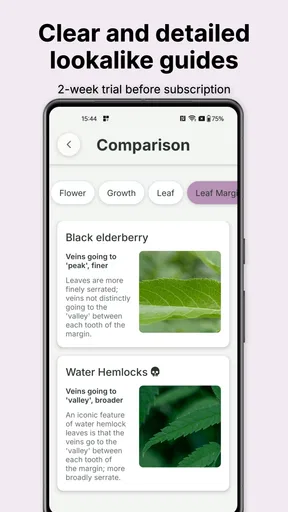
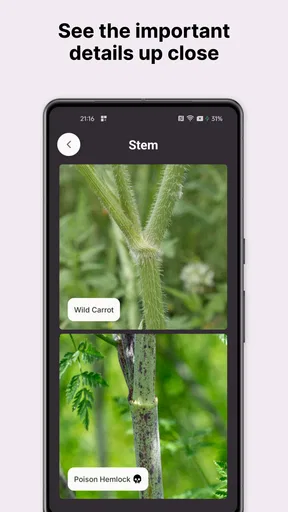
That said, a beginner should not expect the app to remove all of the uncertainty from identification. Plants can look different at different stages, and mushrooms are particularly difficult because small details can separate a safe identification from a dangerous mistake. The app is most useful when I treat each result as a prompt for closer inspection, not as the end of the process.
Worth Reading Before You Choose

EA SPORTS FC Mobile 26 Is a Bigger Football Game, but It Takes Time

Flipboard Shows What News Apps Must Do Beyond the Feed

Switching to Android Auto Means Rethinking Your Driving Routine

Google Calendar Makes a Crowded Week Easier to Manage

Ludo King Makes the Most of the Minutes Between Plans

Baby Panda World Brings Quick Play to Modern Phones, but Its Game Library Feels Busy
Readable information matters more than decorative detail
For an educational app like this, readability is not just a comfort feature. It affects whether someone notices an important distinction or rushes past it. I prefer using Gather in short sessions: observe the specimen, review the relevant information, then compare the details I can actually see. That rhythm is less tiring than trying to absorb a long entry while standing on a trail.
People with different reading abilities may approach the same screen differently. A confident reader may want to scan quickly, while a child or a learner with limited subject knowledge may need to pause over each term. Gather works best when the user is allowed to move slowly and return to an entry instead of feeling pressured to make an instant decision.
My practical advice is to use it before and after a walk as much as during one. At home, you can learn the vocabulary and look at the subject with fewer distractions. Outdoors, use the app to support observation rather than attempting to read everything in bright sunlight, while walking, or with cold hands. This simple division makes the experience more comfortable and reduces careless identification.
Why the compact subject range helps learning
The narrow topic also supports memory. If I repeatedly use the app to compare plants and mushrooms I encounter locally, the visual differences begin to feel less abstract. I start noticing structure instead of relying only on color. That is a more valuable habit than memorizing a name from a single glance.
Families can use the same approach by turning a walk into a question-and-answer activity. One person observes, another describes, and a third checks the app. This avoids putting all the work on the child who first spots the specimen. It also teaches an important lesson: identification is a shared investigation, not a race to produce a label.
For users who have difficulty processing dense information, I would recommend choosing one feature at a time to study. Concentrate on the shape of the leaf, then the arrangement, then the environment. Breaking the task into small observations is more manageable than trying to remember every possible clue simultaneously.
Using it with different abilities and real-world conditions
Here I’m considering the conditions that can make a field session difficult, from glare and cold hands to fatigue or limited dexterity. I find it useful to plan for those realities by separating noticing a specimen from reading about it, so the learning can continue somewhere comfortable. The next section applies that idea to an ordinary outing and the people most likely to benefit.
Motor considerations during outdoor use
Foraging rarely happens in a perfectly controlled setting. You may be standing, crouching, carrying a bag, wearing gloves, or holding a walking aid. That changes how practical any mobile app can be. Even a clear interface becomes harder to use when the phone is exposed to rain, when one hand is occupied, or when the user cannot safely stop on uneven ground.
I would not make Gather the only thing guiding me while moving. I would stop in a safe place, stabilize the phone, and examine the specimen before interacting with the screen. This is especially important for anyone with limited fine-motor control, tremors, joint pain, or reduced balance. The app can support the activity, but it should not make the user take an unsafe posture or step off a stable path.
A useful workflow is to prepare at home, use the app briefly outside, and complete the detailed comparison later. If you take notes or photographs separately, you can keep your attention on the trail and review everything when your hands are free. That approach also helps users who find repeated tapping or holding a phone uncomfortable.
Children may need an adult to handle the device, not because the subject is inaccessible, but because outdoor identification involves judgment. Let the child describe what they see first. Then use Gather together. This preserves the educational value without making the child responsible for a decision they may not be ready to make.
Visual and sensory context changes the experience
Outdoor light is unpredictable. Glare can make a screen difficult to read, and shade can change how a plant’s color appears. I would avoid treating color as the deciding clue and would inspect shape, surface, structure, and surroundings as well. This is good identification practice, but it also helps users who do not distinguish colors easily.
People with low vision may find close reading on a phone tiring, particularly when an entry contains unfamiliar terminology. A larger device can be more comfortable when used at home, while voice assistance or system-level text tools may help depending on the phone and the user’s settings. I would describe these as device-supported options rather than features I would attribute directly to Gather.
For users with sensory sensitivities, a quiet session indoors may be preferable to trying to learn beside traffic, crowds, insects, or strong weather. The app’s educational value does not depend on being used at the exact moment of discovery. Reviewing a specimen later can be a better experience and can produce more careful observations.
Users who are deaf or hard of hearing may appreciate a learning process based on visual observation and written information, but the practical experience still depends on how clearly each entry communicates its distinctions. When information is important, I would pair the app with a trusted field guide or an experienced local forager rather than relying on an informal explanation from another person in the field.
A realistic everyday scenario
Imagine taking a weekend walk with a family member who has limited stamina. You notice a mushroom near the path, but stopping for a long session is not realistic. I would photograph or remember the location without disturbing it, make a quick observation, and return to Gather later at home. The family member can participate by describing the shape and surroundings, while someone else manages the phone.
That scenario shows where the app fits well: it extends a short outdoor moment into a learning activity that can continue indoors. It does not require the user to hike far, collect specimens, or make an immediate decision. For someone who uses a wheelchair, has fatigue, or prefers accessible paths, this flexibility is more meaningful than a promise of constant field use.
The same method works for a commuter who sees a plant beside a sidewalk, a parent planning a short nature lesson, or an older learner who wants to build confidence gradually. Gather is not limited to serious foragers. Its best audience includes people who want to notice more without turning every outing into a demanding expedition.
Where the app is less suitable
I would skip Gather if you want a fully authoritative safety service that tells you whether a mushroom is safe to eat. No phone-based learning tool should replace local expertise, especially when poisonous species resemble edible ones. A printed field guide, a regional mycological group, or an experienced identifier may be the better choice when the consequences of an error are serious.
I would also look elsewhere if your main interest is a broad wildlife catalogue or a detailed scientific reference covering many kinds of organisms. Gather’s value comes from its emphasis on plants and mushrooms. That focus is helpful for a beginner, but it will feel narrow to someone who wants birds, insects, trees, and habitat records in one place.
Compared with a traditional field guide, the app is more convenient to carry and easier to revisit during a study session. A book can be easier on the eyes for some people, can remain usable when a phone battery is low, and may encourage slower side-by-side comparison. I see Gather and a good guide as complementary rather than competing choices.
Costs, expectations, and personal control
Gather can be installed for free, which makes it easy to try without committing money first. It includes in-app purchases ranging from around six dollars to around sixty dollars per item, so I would check the purchase screen carefully before unlocking anything. The free entry point is useful for testing whether the reading style and subject focus suit you, while the optional costs mean the full experience may not be identical for every user.
That pricing structure is worth considering for families, schools, and users on tight budgets. Before planning a group activity around the app, I would make sure the material needed for that activity is available without an unexpected purchase. If you are only curious about local plants and mushrooms, begin with a small, specific learning goal rather than assuming you need every available addition.
The Everyone rating makes the app approachable for mixed-age households, but age suitability is not the same as risk-free use. Children should understand that touching or eating an unknown plant or mushroom is not part of the lesson. The safest activity is observation, description, and discussion, with an adult handling any decision involving collection or consumption.
Remaining barriers that affect inclusive use
The biggest barrier is not necessarily navigation; it is the complexity of the subject itself. Foraging terminology can be unfamiliar, and visual differences may be subtle. A user with memory difficulties, limited language confidence, or little outdoor experience may need repetition and support from another person. Gather can be part of that support, but it cannot replace patient teaching.
Another barrier is context. A phone is not equally convenient for everyone in rain, cold, glare, or unstable terrain. People with limited connectivity, restricted data access, or short battery life may prefer preparing information before leaving home and carrying a second reference. I would plan around those conditions instead of assuming the app will always be comfortable in the field.
There is also a confidence barrier. An attractive image or a plausible name can make a new user feel more certain than they should. My rule is simple: if the identification affects what I might eat, I require independent confirmation. Gather is excellent as a learning companion, but I would never let convenience overrule caution.
Finally, local ecology matters. A plant or mushroom that is common in one region may be absent or look different elsewhere. The app can help develop observation skills, yet users should still learn from regional sources and local experts. This is particularly important for people who are new to the area or who are learning in a language different from the one used in their usual field guides.
My inclusive verdict
After using Gather as a focused learning companion, I think it succeeds best when it gives people permission to be curious without demanding expert knowledge on day one. Its plant-and-mushroom focus is clear, its free starting point lowers the barrier to trying it, and its Everyone rating makes it suitable for shared learning when adults provide sensible supervision.
The most accessible way to use Gather is to separate observation from decision-making. Notice the specimen safely, review the information at a comfortable pace, and ask for independent help whenever identification could affect health. That workflow benefits beginners, children, people with limited mobility, and anyone who finds outdoor phone use tiring.
I would recommend it to casual nature learners, families, and aspiring foragers who want a portable introduction to wild plants and mushrooms. I would not recommend relying on it alone for edible-mushroom decisions, nor would I choose it over a broader reference if your interests extend far beyond its subject. The optional purchases also deserve attention before it becomes part of a regular class or group activity.
Overall, Gather: The Foraging App is a useful, approachable addition to an outdoor learning routine. Its real strength is not turning a phone into an unquestionable authority; it is helping me look more carefully, ask better questions, and continue learning after I return home. For that purpose, it earns a place beside—not instead of—regional guides, experienced people, and careful judgment.
Pros
- Helps identify edible plants through searchable species profiles.
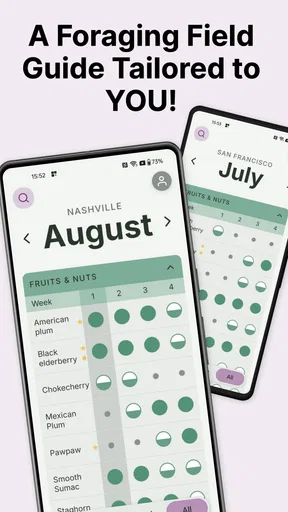
- Useful for planning seasonal foraging trips and discovering nearby spots.
- Encourages mindful outdoor exploration and learning about local nature.
- Community contributions can provide fresh sightings and regional knowledge.
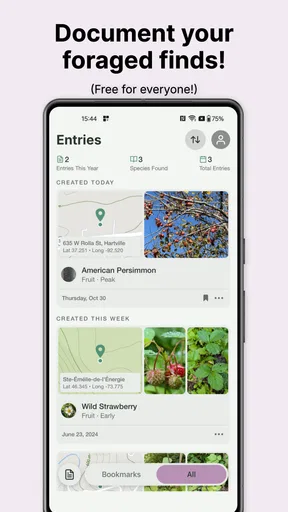
- Can make foraging notes easier to organize than using paper guides.
Cons
- Plant identification should be verified with an expert before eating anything.
- Coverage and species information may vary significantly by location.
- Some useful features or content may require an account or paid access.
- User-submitted reports can be incomplete
- outdated
- or incorrectly labeled.
- Outdoor use may depend on GPS accuracy
- mobile signal
- and battery life.
FAQs for Gather: The Foraging App
What is Gather: The Foraging App used for?
Gather: The Foraging App is designed to help people discover, identify, and learn about wild plants, mushrooms, and other natural foods while exploring outdoors. It can serve as a field companion for beginners and experienced foragers by organizing useful information in one place. However, it should support—not replace—local knowledge, expert guidance, and careful personal verification before anything is eaten.
Can Gather accurately identify every plant or mushroom?
No identification app should be treated as completely reliable, and Gather is no exception. Photos can be affected by lighting, camera quality, growth stage, and similarities between safe and poisonous species. Use the app’s results as a starting point rather than a final answer. Never consume a wild plant, mushroom, or berry based only on an app identification; confirm it with a qualified local expert or trusted field guide.
Is Gather suitable for beginners in foraging?
Gather can be useful for beginners because it brings identification information and foraging-related guidance into a convenient mobile format. Its visual approach may make outdoor learning less intimidating, especially during walks or hikes. New users should still begin with common, easily recognized species, learn local regulations and hazards, and avoid tasting anything until they have developed reliable identification skills through reputable instruction.
Does Gather work without an internet connection?
Offline availability may depend on the app version, the information being accessed, and whether content has been saved or downloaded in advance. Before heading into remote areas, open the app and check which features remain available without mobile data or Wi-Fi. It is also sensible to carry a printed field guide, a charged phone, and basic navigation equipment, since outdoor coverage can be unreliable.
Is Gather free to download, and are there in-app purchases?
The download price, included features, advertising, and any optional subscriptions or in-app purchases can vary between Android and iOS and may change over time. Check the current store listing before installing to see exactly what is included in the free version. Also review subscription terms carefully if premium content is offered, particularly renewal details and whether a trial converts into a paid plan.


